
Photos Memo³ (Free)1.6 - Google Play
You'll be able to see results in few seconds.
Publisher Description
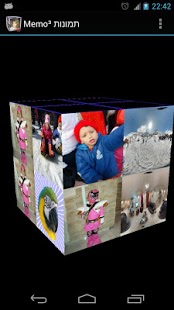
A tri dimensional game based on classical model of flipping two cards and memorizing the images drawn on the cards. When cards contain different images, they will return to the initial state. When cards contain identical images, they stay open. The goal is to find all couples of identical images. The success depends on short term visual memory and good concentration. Rotations of the object makes the mission more difficult to complete, requires to remember not only the position of the card on table, but also on which side of the cube (or other object) the card was placed.
You play with your own photos from phone/tablet's camera.
Look for two identical photos on sides of cube or other 3D object.
No enough pictures in Gallery? Do not worry, instead of missing photos, we provide pictures of 100 animals to play with.
Photos are randomly selected and placed on sides of a cube or pyramid or Cube³.
Player need to find all pairs of images to complete the level.
There are two modes of difficulty:
Easy (default) mode – photos are placed on 4 sides of a cube or on 3 sides of a pyramid, object can be rotated only horizontally (over Y axis) by sliding left<->right;
Hard mode – photos are placed on all 6 sides of a cube or on 4 sides of a pyramid, object can be rotated horizontally or vertically (over Y and X axis) by sliding left<->right or up<->down;
In order to change the mode or turn sound off/on tap on standard menu button.
Also, there are four levels of difficulty:
1x1, 2x2 ,3x3, 4x4 photos on side, game starts from level1 and goes to the next level, only if the level is completed good enough (less clicks - better score).
This app is completely free, thanks to advertising networks used: Admob - it will help us to keep developing more apps.
About Photos Memo³ (Free)
The company that develops Photos Memo³ (Free) is kindergarten. The latest version released by its developer is 1.6.
To install Photos Memo³ (Free) on your Android device, just click the green Continue To App button above to start the installation process. The app is listed on our website since 2014-07-28 and was downloaded 0 times. We have already checked if the download link is safe, however for your own protection we recommend that you scan the downloaded app with your antivirus. Your antivirus may detect the Photos Memo³ (Free) as malware as malware if the download link to com.kindergarten.PhotosMemo3d is broken.
How to install Photos Memo³ (Free) on your Android device:
- Click on the Continue To App button on our website. This will redirect you to Google Play.
- Once the Photos Memo³ (Free) is shown in the Google Play listing of your Android device, you can start its download and installation. Tap on the Install button located below the search bar and to the right of the app icon.
- A pop-up window with the permissions required by Photos Memo³ (Free) will be shown. Click on Accept to continue the process.
- Photos Memo³ (Free) will be downloaded onto your device, displaying a progress. Once the download completes, the installation will start and you'll get a notification after the installation is finished.
Program Details
System requirements
Download information
Pricing
Version History
version 1.6
posted on 2014-07-28
version 1.4
posted on 2013-04-26
Several fixes and updates
Disclaimer
Official Google Play Link
We do not host Photos Memo³ (Free) on our servers. We did not scan it for viruses, adware, spyware or other type of malware. This app is hosted by Google and passed their terms and conditions to be listed there. We recommend caution when installing it.
The Google Play link for Photos Memo³ (Free) is provided to you by apps112.com without any warranties, representations or guarantees of any kind, so access it at your own risk.
If you have questions regarding this particular app contact the publisher directly. For questions about the functionalities of apps112.com contact us.
